






































Capturing smooth, professional-looking video can be challenging, especially when walking, travelling or filming handheld. Even small camera movements can create unwanted shaking, making footage appear distracting or difficult to watch.The DJI Osmo Pocket 3 addresses this problem with its built-in mechanical 3-axis gimbal stabilisation system. Designed for vloggers, travellers and content creators, this compact camera helps deliver smooth footage without requiring a separate stabiliser.But how does the DJI Osmo Pocket 3 gimbal actually work, and what makes it different from ordinary smartphone stabilisation?This guide explains the technology behind its 3-axis gimbal, how it improves video quality and when it delivers the biggest benefits.
1. What Is 3-Axis Gimbal Stabilisation?
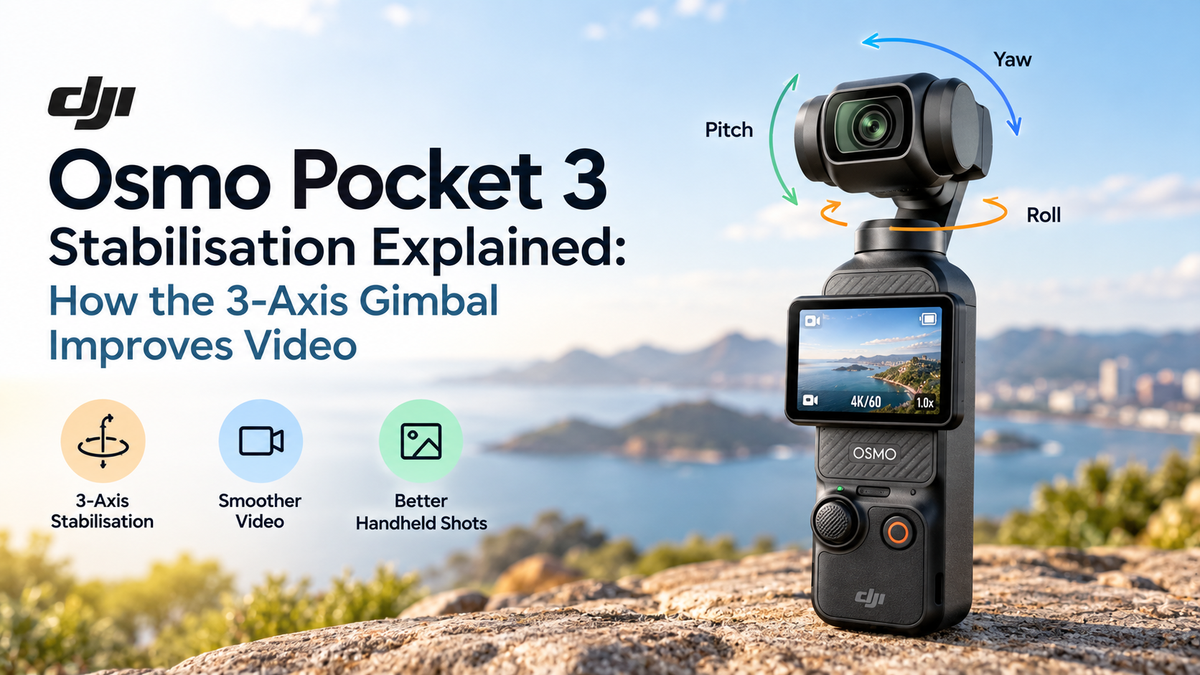
A 3-axis gimbal is a mechanical stabilisation system that compensates for unwanted camera movements across three directions.Unlike electronic stabilisation, which adjusts video digitally, a mechanical gimbal physically moves the camera to maintain a steadier orientation.The three axes are:
-
Pitch: Controls upward and downward camera tilting.
-
Roll: Compensates for sideways rotation that can make the horizon appear tilted.
-
Yaw: Controls left and right camera rotation.
The DJI Osmo Pocket 3 uses motors and motion sensors to make continuous adjustments as the camera moves.For example, when walking with the camera, the gimbal helps reduce unwanted tilting and rotation caused by hand movements.The result is smoother footage with fewer distracting movements.
2. How the DJI Osmo Pocket 3 Gimbal Works
The Osmo Pocket 3 combines motion sensors, stabilisation algorithms and miniature motors to keep its camera steady.When the user moves, the system detects changes in orientation and adjusts the gimbal accordingly.These adjustments happen continuously during recording.If your hand tilts slightly while filming, the camera can compensate to maintain a more stable view.This technology is particularly useful when recording while walking, following moving subjects or changing camera direction.However, mechanical stabilisation does not eliminate every type of movement.Vertical bouncing from footsteps can still appear because a 3-axis gimbal primarily controls rotation rather than physical up-and-down movement.Nevertheless, it significantly improves handheld footage compared with an unstabilised camera.
3. Why Mechanical Stabilisation Improves Video Quality
One major advantage of the DJI Osmo Pocket 3 is its ability to stabilise footage optically through physical camera movement.Electronic image stabilisation generally relies on digitally adjusting recorded frames, sometimes requiring additional cropping.A mechanical gimbal can maintain a steadier camera orientation without depending on the same digital correction process.This helps preserve the intended framing and reduces the need for aggressive stabilisation during editing.It also produces more natural camera movement when panning or following a subject.For creators who want polished footage straight from the camera, this can save considerable editing time.
4. Walking and Travel Videos: Smoother Handheld Footage
Travel videos often involve recording while walking through streets, parks, markets and tourist attractions.Without stabilisation, each step can introduce noticeable shaking.The DJI Osmo Pocket 3 helps reduce unwanted rotational movement, making handheld walking footage appear smoother.Its compact design also makes it easier to carry than larger cameras with external gimbals.For Australian travellers exploring coastal locations, city attractions or outdoor destinations, this portability is particularly useful.To achieve the best results, walk slowly, keep your knees slightly bent and hold the camera steadily.These techniques help reduce vertical bouncing that the gimbal cannot fully correct.
5. Gimbal Modes: Follow, Tilt Locked and FPV
The DJI Osmo Pocket 3 offers different gimbal modes for various filming situations.
Follow Mode
The camera follows horizontal and vertical movements while keeping roll stabilised. This mode is suitable for everyday vlogging, walking footage and general handheld recording.
Tilt Locked Mode
The camera follows horizontal movements while keeping its tilt angle relatively fixed. This is useful for maintaining consistent framing when moving around a location.
FPV Mode
The camera follows movement across all three axes, allowing more dynamic and immersive footage.FPV mode is particularly useful for creative shots where controlled camera rotation is part of the intended effect.Choosing the appropriate mode helps achieve more natural-looking footage.
6. ActiveTrack 6.0 and Subject Tracking
The DJI Osmo Pocket 3 includes ActiveTrack 6.0, which works alongside its gimbal system to keep selected subjects in the frame.Instead of manually adjusting the camera direction continuously, users can select a subject for the camera to follow.The gimbal then adjusts its orientation to maintain the subject's position.This feature is useful for solo vloggers, presenters and creators recording moving subjects.For example, someone filming a walking presentation can use subject tracking to maintain more consistent framing.Tracking performance can still vary with lighting, obstructions and subject movement.
7. How Stabilisation Helps 4K Video Recording
The DJI Osmo Pocket 3 supports video recording at up to 4K resolution and 120 frames per second in supported slow-motion settings.Its 1-inch CMOS sensor captures detailed footage, while the mechanical gimbal helps keep camera movement controlled This combination is particularly valuable when filming handheld.High-resolution footage can make unwanted shaking more noticeable, especially on large displays.The gimbal helps produce steadier video, allowing viewers to focus on the subject rather than camera movement.For content creators producing YouTube videos, travel films or promotional clips, this can improve overall presentation quality.
8. DJI Osmo Pocket 3 vs Smartphone Stabilisation
Modern smartphones often combine optical image stabilisation with electronic stabilisation.These systems can produce impressive results, particularly during everyday recording.However, the DJI Osmo Pocket 3 uses a dedicated mechanical gimbal designed specifically for video capture.This provides controlled camera rotation and smooth tracking without requiring a separate handheldstabiliser.Smartphones remain convenient because they combine filming, editing and sharing in one device.The Pocket 3 becomes particularly appealing when smooth camera movement is a priority.For dedicated video creators, the gimbal can offer more creative control than conventional handheld smartphone recording.
9. Best Tips for Smoother DJI Osmo Pocket 3 Footage
Although the Osmo Pocket 3 includes advanced stabilisation, filming technique still matters.Move slowly when walking and avoid sudden changes in direction.Use Follow Mode for general handheld recording and Tilt Locked Mode when you want consistent camera angles.Keep your grip relaxed but controlled, and avoid unnecessary wrist movements.For longer tracking shots, consider using an extension handle or compatible accessory.When filming running sequences or fast-moving action, remember that the gimbal cannot completely remove vertical movement.Combining proper technique with mechanical stabilisation produces the best results.
10. Is the DJI Osmo Pocket 3 Worth It for Video Stabilisation?
The DJI Osmo Pocket 3 is particularly suitable for vloggers, travellers, social media creators and people who frequently record handheld video.Its mechanical 3-axis gimbal provides smooth rotational stabilisation without requiring bulky equipment.Features such as ActiveTrack 6.0, multiple gimbal modes and 4K recording make it versatile for different filming situations.However, users primarily recording stationary videos may not benefit as much from its gimbal technology.For creators who regularly film while moving, the stabilisation system is one of the camera's strongest advantages.