





































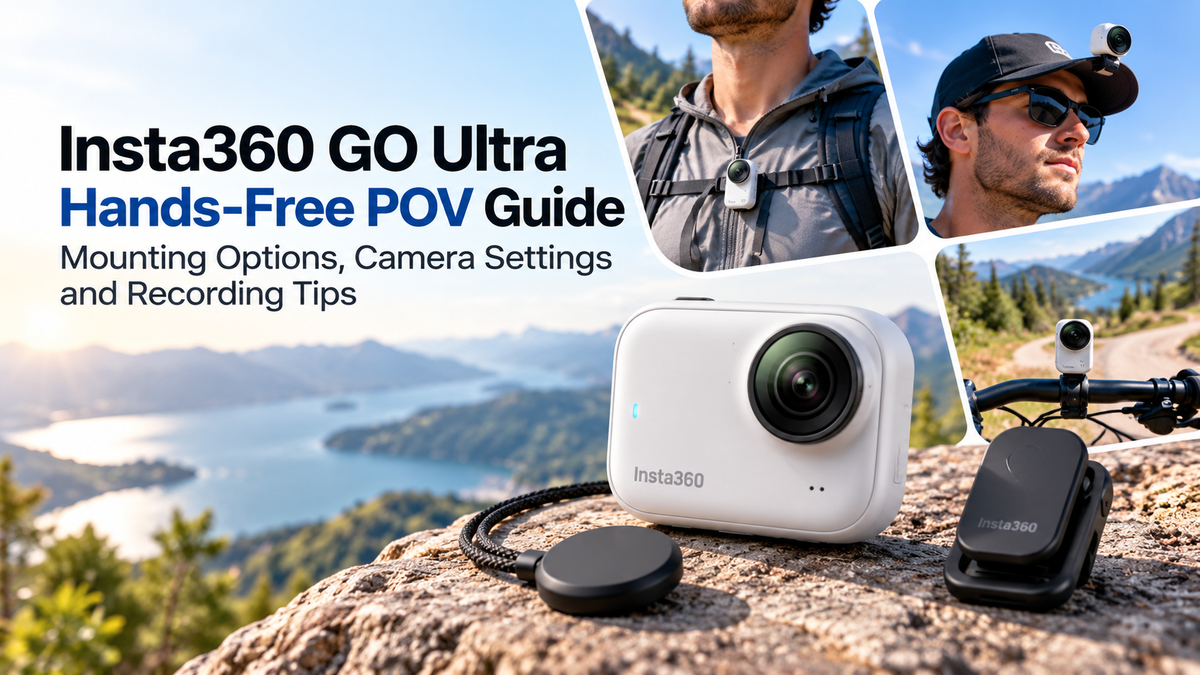
Capturing immersive first-person videos no longer requires bulky camera equipment. Compact action cameras make it easier to record everyday adventures, travel experiences and creative content without constantly holding a device.The Insta360 GO Ultra is designed for portable, hands-free recording. Its compact magnetic camera, 4K video capabilities and FlowState stabilisation make it an appealing choice for vloggers, travellers and outdoor enthusiasts.However, achieving professional-looking POV footage requires more than attaching the camera and pressing record.This guide explains the best Insta360 GO Ultra mounting options, recommended camera settings and practical recording techniques.
1. What Makes the Insta360 GO Ultra Suitable for POV Recording?
POV, or point-of-view recording, captures footage from the perspective of the person wearing or carrying the camera.The Insta360 GO Ultra is particularly suitable for this because of its small, lightweight design.The standalone camera weighs approximately 53g, making it convenient for wearable recording.Its magnetic mounting system allows users to position the camera on compatible accessories without constantly holding it.The camera also features a 1/1.28-inch sensor and supports video recording up to 4K at 60fps.These features make it useful for walking tours, cycling, travel videos and everyday content creation.
2. Magnetic Pendant: Best for Chest-Level POV Videos
The Magnetic Pendant is one of the most convenient accessories for hands-free recording.It is worn underneath clothing, allowing the camera to attach magnetically from the outside.This creates a chest-level perspective that works well for everyday activities.For example, you can record cooking demonstrations, walking tours, shopping experiences or travel adventures.Chest-mounted footage can feel natural because viewers see the environment from approximately the wearer's perspective.However, camera positioning matters.Ensure the pendant sits securely and that clothing does not obstruct the lens.For smoother footage, avoid loose garments that allow excessive camera movement.
3. Magnetic Easy Clip: Useful for Different Camera Angles
The Magnetic Easy Clip provides another mounting option for the Insta360 GO Ultra.It can attach to suitable clothing or accessories, allowing users to experiment with different viewpoints.For example, attaching the camera near a cap brim can create a higher perspective than chest-mounted recording.This may be useful for hiking, sightseeing and outdoor activities.However, mounting stability depends on the attachment surface and movement.Before recording, check that the camera is secure and the lens is facing the intended direction.For activities involving sudden movement, consider a more secure mounting solution.
4. Other Mounting Options for Creative POV Footage
The Insta360 GO Ultra can also be used with compatible mounting accessories for different recording situations.Handlebar mounts are useful for cycling, while suitable backpack attachments can capture hiking experiences.Tripods and adhesive mounts can provide fixed viewpoints for demonstrations or time-lapse videos.The Action Pod also offers additional control and framing options.When choosing accessories, confirm they are compatible with the GO Ultra rather than assuming older GO-series mounts will fit.For high-impact activities, use appropriate safety precautions and secure the camera against accidental detachment.
5. Best Insta360 GO Ultra Settings for POV Recording
Selecting the right video settings helps improve footage quality.For detailed everyday recording, 4K at 30fps is a practical starting point.It provides high resolution while keeping recording requirements manageable.For faster activities, 4K at 60fps can capture smoother movement.A wider field of view is useful for POV videos because it captures more of the surrounding environment.However, very wide settings can introduce visible distortion near the edges.Use a narrower view when a more natural perspective is preferred.The best settings depend on lighting, movement and the intended viewing platform.
6. FlowState Stabilisation: Keeping Footage Smooth
Camera shake can make POV footage uncomfortable to watch.The Insta360 GO Ultra uses FlowState stabilisation to help reduce unwanted movement.This is especially useful when walking, running or recording handheld footage.Horizon Lock can also help maintain a level-looking image in compatible recording modes.However, stabilisation cannot completely eliminate every sudden movement.For better results, keep the camera firmly attached and avoid unnecessary body movement.When walking, maintain a steady pace and minimise abrupt turns.Combining effective stabilisation with careful mounting produces more professional-looking footage.
7. Recording POV Videos in Different Lighting Conditions
Lighting significantly influences video quality.For outdoor recording, natural daylight generally provides the best conditions.However, extremely bright environments can create strong highlights and shadows.Adjust exposure settings when necessary to preserve important details.For indoor recording, position yourself near windows or other suitable light sources.The GO Ultra's larger sensor supports improved low-light recording compared with smaller-sensor designs.Nevertheless, dark environments can still introduce image noise and reduced detail.Avoid moving rapidly between very bright and dark areas when consistent exposure is important.
8. Battery Life and Storage for Longer Recordings
Battery management is important when recording extended POV footage.The standalone Insta360 GO Ultra camera offers up to approximately 70 minutes of runtime under specified testing conditions.Combined with the Action Pod, advertised runtime can reach approximately 200 minutes.Actual recording duration depends on resolution, frame rate, temperature and enabled features.The GO Ultra uses removable microSD storage rather than relying entirely on fixed internal memory.Choose a compatible, high-quality memory card with sufficient capacity for your recording needs.Before leaving home, charge the camera and Action Pod, check available storage and test recording functionality.
9. Best POV Recording Tips for Beginners
Creating engaging POV footage requires thoughtful camera positioning and movement.Start by recording a short test clip to confirm the camera angle.For chest-mounted recording, slightly adjust the camera direction so important subjects remain visible.Avoid excessive head or body movement, particularly when recording walking videos.Capture a variety of scenes rather than recording one continuous sequence.For example, combine walking footage with close-up activities and wider environmental shots.Keep the lens clean, especially during outdoor adventures.If recording in crowded environments, respect other people's privacy and follow local filming restrictions.
10. Editing Insta360 GO Ultra POV Videos
Editing helps transform raw POV footage into engaging content.The Insta360 app provides tools for reviewing clips, adjusting framing and exporting videos.For Instagram Reels, TikTok and YouTube Shorts, vertical framing is usually preferred.For traditional YouTube videos, horizontal framing may be more suitable.Choose the intended format before recording whenever possible.Trim unnecessary footage, remove distracting sections and arrange clips into a clear sequence.Use music and transitions selectively rather than adding effects to every scene.Good pacing and clear storytelling often matter more than complicated editing.
Is the Insta360 GO Ultra Worth It for Hands-Free POV Recording?
The Insta360 GO Ultra offers a convenient combination of portability, flexible mounting and high-resolution video recording.Its magnetic accessories make it particularly appealing for travellers, vloggers and creators who want to record activities without holding a camera.However, mounting security, battery limitations and recording conditions should be considered before purchasing.For Australian buyers, checking the Standard Bundle contents and compatible accessories can help avoid unnecessary additional purchases.